.jpeg)

Purple Mash is a creative educational website for children. Purple Mash is a cross-curricular resource covering everything from Maths and English to Computing and Art. Your child can access Purple Mash from home on a laptop, desktop or a tablet.
Purple Mash is a safe environment that doesn’t require any downloading or allow interaction with people online and children cannot make any financial transactions.
We will be encouraging the children to further explore the subjects and topics they enjoy from school at home and Purple Mash is a great resource for this. Your child will be taught how to use Purple Mash in school and will be able to use it without supervision but you may want to take a few minutes to explore it yourself so that you can help them with their work.
Creative Tools & Games
There are 20+ open-ended creative tools and games inside Purple Mash. They range in complexity from simple painting programs to sophisticated coding tools. If you’re using something for the first time it is a good idea to watch the help vidoes which can be found by clicking the monitor icon.
Saving and Sharing Work
Purple Mash lets your child save their work online. It’s very easy just look out for the floppy disk icon on the toolbar and follow the simple instructions. To access saved files go to the ‘Online Docs’ tab. Once saved you can also ‘share’ work. Just look out for the globe icon on the toolbar. This will give you a link that can be used to view the work by people that don’t have Purple Mash.
Topics and Themes
Purple Mash has over 2,000 ready-to-use themed writing and painting projects. They cover everything from aliens to the Victorians. You can either use the ‘Themes’ tab to browse by subject and topic or alternatively use the search bar in the bottom right of the screen to look for something specific.
2Code
2Code puts children as young as five on the path to becoming computer programmers. Everything is broken down into step-by-step lessons with video instructions. Coding is now a part of the National Curriculum 2014. If you wanted to find out the kinds of things that your children will be learning then having a go at 2Code yourself is a great place to start.
Serial Mash
Serial Mash is all about getting children to read for pleasure. New books are released each half-term as a weekly serial. The chapters come with a range of fun and educational activities. Serial Mash is great for solo or guided reading and can be read on tablets. You can take a look the current books in the ‘Serial Mash’ tab. The books are aimed at children aged 7-9 and 9-11.
Purple Mash On Tablets
If you have an ipad then there are several free apps that you can download as part of Purple Mash. These include Mash Cams, 2DIY and 2Create a Story. You can download them from the App Store and sign in with your Purple Mash username and password. Alternatively, you can use Purple Mash on a tablet by opening it up in a browser window on your device. Not all of the tools work on tablets but there are lots that do.
Want to know more?
If you’re keen to get to know Purple Mash inside and out there is a video trainer that will lead you through the whole of Purple Mash and explain exactly what it can do. You can view the video trainer using the link below.
http://www.purplemash.co.uk/app/videos/videotrainer
Click on the picture below to go directly to the Shawclough Purple Mash log on page:


About Espresso Primary
Espresso Primary is an online cross-curricular service that provides video-rich resources to schools throughout the UK. It contains thousands of videos and multimedia activites. as well as a weekly news service - all designed by teaching proffessionals.
How to access Espresso from home
To access Espresso from home you will need a PC or Apple Mac and a connection to the internet. You can then go to https://www.discoveryeducation.co.uk/resources/primary/espresso/ and enter your child's username and password. These login details are given to your child in school. If your child does not have these details, please ask them to speak with their teacher.
.jpg)
Times Tables Rock Stars is a carefully sequenced programme of daily times tables practise. Each week concentrates on a different times table, with a recommended consolidation week for rehearsing the tables that have recently been practised every third week or so.
The benefits of Times Table Rock Stars are
- Incorrect answers are always immediately corrected in front of the pupil so that they start to associate the correct answer to every question.
- The clever code behind the scenes works out which times tables facts each pupil is consistently taking longer to answer and then it gradually starts to present these facts more frequently until pupils have mastered them.
- It will also ask related division questions 20% of the time in order to reinforce division facts
How to access TT Rock Stars from home
The Times Table Rock Stars app is available to download on iTunes and android but can also be accessed on a PC or Apple Mac with internet connection. Follow the link below to the website: https://www.ttrockstars.com and enter your child's username and password. These login details are given to your child in school. If your child does not have these details, please ask them to speak with their teacher.

https://www.thenational.academy/pupils/years
Oak National Academy has a pupil area that has been carefully designed to be straightforward for pupils to use. With a clear, step-by-step approach, pupils are guided through each section so they know exactly what is needed for a lesson and can easily track their own progress.
Pupils will be taken through a lesson by giving them an introduction in a lesson overview page, a downloadable worksheet, a prior knowledge starter quiz, a lesson video and an assessment exit quiz.
Results of the lesson can be shared with you afterwards.
Our learning wall has access to online resources that can be used at home to help and support your childs learning.
Click the image below

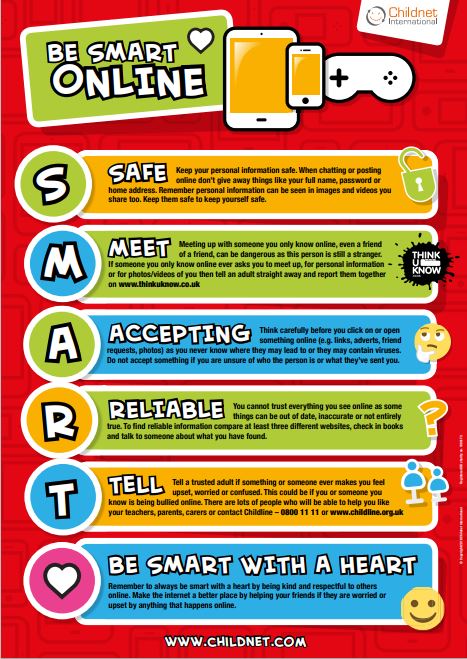
Keeping your child safe online while they are home learning?
Thinkuknow is the national online safety education programme from CEOP and you can visit their website for the most up to date online safety advice.
Childnet is a UK-based charity who empower children, young people, and those who support them in their online lives, and its mission is to work with others to make the internet a great and safe place for children and young people.
Click the links to find out more about online safety and support.
www.thinkuknow.co.uk www.childnet.com